Useful Tools and Tips
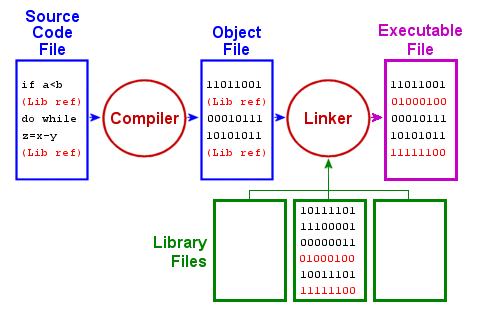
What does ‘compile’ mean?
Simple C examples
Comments:
/* This is one type of comments */
// This is another type of comment
Arrays
Remember in C array indexing start at 0 upwards.
1D array:boxes[0], boxes[1]
2D array: boxes[0][0]
3D array: boxes[0][0][0]
printf
This is used to print things to the terminal/command prompt.
Examples:
| Print Statement | Output |
|---|---|
| print(“Hello my name is piglet”); | Hello my name is piglet to the prompt |
| printf(“Hello there are %d piglets in the room!”, 14); | Hello there are 14 piglets in the room |
| printf(“Hello there are %e piglets in the room!”, 13.2); | Hello there are 1.320000e+01 piglets in the room! |
fprintf
The syntax is the same but you put a reference to an output file as the first parameter:
fprintf(bm->logFile, “Hello my name is piglet!”);
This will print ‘Hello my name is piglet to the log file’.
For more information see http://www.cplusplus.com/reference/clibrary/cstdio/printf/.
Redirect output to files
When you run Atlantis there are lots of messages written to the command prompt. It can be very useful to redirect these to some text files so you can read them a bit easier.
To do this use the following:
atlantismain.exe -i outputFile.nc 0 -o outputSETAS.nc -r VMPA_setas_run_fishing_F.prm -f VMPA_setas_force_fish.prm -p VMPA_setas_physics.prm -b VMPA_setas_biol_fishing.prm -h VMPA_setas_harvest_econbased.prm -a VMPA_setas_assess.prm -e VMPA_setas_economics.prm -s functionalGroups.csv 1> out1.txt 2>out2.txt
So note the last bit of the command:
program.exe 1> out1.txt 2>out2.txt
Technical stuff:
This will direct the errors to out2.txt and the normal messages to out1.txt.
Copy your exe